
Costs, security and how you want to work in the future are factors that affect the choice. Should your systems be flexible and scalable, or do you want full control and everything gathered locally? In this article we look at the differences between a local server and cloud services, so that you can more easily choose what is right for your business.
What is the difference between a local server and cloud services?
With a local server (on-prem), the systems run either on your own servers on the company's premises or on dedicated infrastructure at a provider that offers private cloud, often with operations included. Today relatively few organisations run entirely their own servers themselves.
With cloud services, such as Microsoft Azure, the systems run in the provider's shared data centres. Here you rent capacity and do not have to operate the infrastructure yourself, but you are still responsible for using the services securely and correctly.
In addition, some providers offer arrangements where you can buy or rent hardware that they operate for you, which gives a model midway between your own server and full cloud.
What do the different options cost?
When you compare a local server and cloud services, you should look at the total cost of ownership (TCO), preferably over 3-5 years.
- Local server: You have to invest in hardware, licences, power, cooling, physical space and IT resources. On top of that come maintenance, upgrades and the risk of downtime. Many underestimate these costs because they are not visible in the budget, including the time spent on fixing faults and on day-to-day operations.
- Cloud services: Here you usually pay by consumption or a fixed monthly price. You avoid large start-up investments, and capacity can be adjusted as needed, but without good governance the costs can grow, especially with unstructured storage or high traffic.
The price varies with need, usage volume and complexity. The cloud often gives lower operating costs and better predictability, but on-prem can pay off in certain cases, especially if you already have the infrastructure in place.
Performance, availability and SLA
A major advantage of cloud services is access to global infrastructure and service level agreements (SLAs). These are guarantees from the provider about availability and uptime, often 99.9% or more. That gives peace of mind for systems that have to work around the clock.
With a local server, performance is limited by the hardware you have bought. If something goes wrong, you are responsible for troubleshooting and recovery yourself. That can take time, and so become costly.
Security - who is responsible?
Cloud services follow what is called the Shared Responsibility Model. This means that the provider is responsible for the infrastructure itself, such as data centres and networks, and you as the customer are responsible for how the service is used. This includes access management, passwords, data encryption and which data is stored where.
With a local server, the whole physical and digital responsibility lies with you. You control everything yourself, but that also means you need the expertise and resources to handle security.
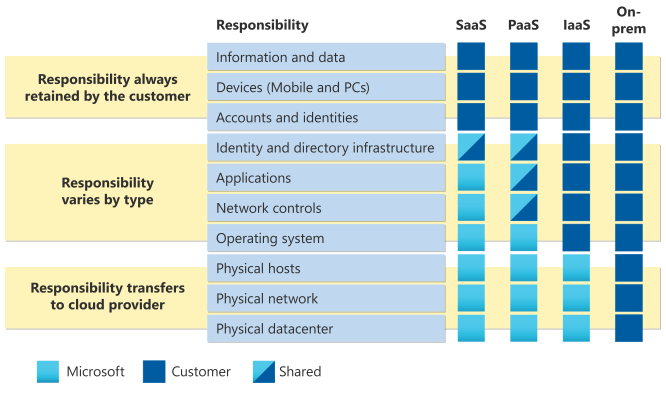
Shared Responsibility Model from Microsoft
Regulatory requirements and sensitive data
Not all data can simply be stored in the cloud. The GDPR and certain industry standards (especially in health, finance and the public sector) set strict requirements for storage, access and control.
A local server gives you full control over where the data is stored, which can be an advantage when handling sensitive information. Cloud services meet most regulatory requirements, but it is still your responsibility to ensure compliance with the rules.
Migrating to the cloud - how to get started
Migrating to the cloud is the process of moving data, systems and services from local infrastructure to a cloud service. It requires good planning and control, and should be done in four steps:
1) Map your needs: What do you want to achieve? Reduce costs, increase security, improve flexibility or modernise applications? Prioritise systems and clarify the requirements for performance, availability and compliance.
2) Choose a platform: Azure for business is a popular choice, with high security, built-in compliance and close integration with Microsoft Entra (identity and access).
3) Plan and carry out the migration: Start with smaller systems that are not business-critical. Test and validate performance, security and backup before going into production, and provide training along the way.
4) Operations and optimisation after the migration: Establish ongoing updates (patching), security measures and monitoring (logs/alerts). Set up backup and recovery, cost management (budgets/alerts), access management through Entra/Policy, and regular reviews of performance, security and cost. This keeps the environment stable, secure and cost-effective over time.
Wondering whether moving to the cloud pays off? Read about the benefits of the cloud here.
Ready to move to the cloud?
We help you assess your needs, structure the environment and make a safe transition to modern, cloud-based operations with Azure. Get in touch with us to get started.